Tag: computer

The case of the password vs insanity.

Image


We have all heard that the definition of insanity is: doing the same thing over and over again expecting different results.  This was not lost on me when recently my password on my home PC was no longer accepted.

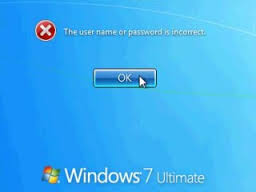
Imagine logging in to your own PC, that no one else touches, and the password no longer works.

I cannot tell you how many times that I tried the password that I know that it is supposed to be, and then doubting my sanity, trying every other password that it might be “just in case I changed it” without remembering I did. 

Image

The only reason there was a smidgeon of a doubt is that recently Yahoo forced me to change my password.  They would accept nothing less than a strong password which by the way is so strong that I have trouble typing it while looking at it, and there is not a chance of remembering it.

No longer are the days of the family pet or address or birthday acceptable as passwords.  Imagine having to type a password like this T4^s#hg^9? every time you logged on to your computer!

While the home PC’s password was not quite this strong, there is more than room for error.  This led to a rather frustrating afternoon as one might guess.

The trouble shooting process was difficult as Windows allows little room for error and certainly not much for diagnostics.  My first guess was the keyboard had to be messing up in some way so I changed the batteries.  When that did not bear fruit I hooked up a hard wired keyboard to the USB port and still nothing.  “Incorrect login name or password.” 

Image

Google produced nothing relevant other than an ad for some company that sells some software to recover your password.  Microsoft was no help.  If I were in a decision making role at Microsoft I would make some sort of option on the login screen that would allow for one to make certain that their keyboard is typing the correct letter and that the caps is on or off.  Wireless keyboards don’t have any LED on them to tell you about “num lock” or shift lock and , the screen was not giving me any hint of this either although it normally would.

Windows 7 offers a way to reset the password, but you have to plan for it first and oh yes, it requires the “A drive, a floppy.”  This too needs to be re-thought as few computers today have a floppy drive.

Image

Somewhere in the process of trying to boot into safe mode I get an error that says “keyboard failure.”

At this point I try the wired keyboard into several different USB ports with the same results.  I then installed a usb card thinking that maybe that would work, nope same results.

I could do things in Bios but not in Windows.  The thing that would have helped is a way to check the keyboard, in Bios.  My guess is that Bios is not as picky about what it sees from the keyboard and since you are only using limited keyboard functions, curser movements, enter and tab, one would not have guessed that the USB was having issues.

I just happen to own another machine of identical configuration, so a swap of the hardrive to the other machine rendered a machine that worked with my password that worked all along.

I can only conclude that there is an issue with the USB controller on the motherboard.

I am considering clearing out the Bios on the old board and trying a re-install of the software just to see if that fixes it.  There may also be some sort of update from Dell for that Bios.

For you hardware junkies out there, this is probably standard fare.  While I could have purchased a new machine for the $$ wasted in time to diagnose this, I have a new found empathy towards those who just use the machine and have no clue how it works.

Can you imagine Joe Q User out there that really looks for the “any key” having an issue like this?Image

If I was frustrated (and I have been at this when DOS 1 was new,) I cannot even fathom what something like this would be like for others who have less experience than I.

I hope that this helps someone somewhere possibly saving some time and frustration as this type of bugaboo should not happen.

Image


Best to you and those that you care about!


Certifications a good idea or bad?

Certifications a good idea or bad?


Is the person with the most certifications the best hire?  Maybe yes, maybe no. 


The history of the certification for IT really started with Novell.  Novell used to charge computer manufacturers to “certify” that their equipment was compatible with their software.  This was no inexpensive proposition.  Somewhere around the release of V2.15 there was the invention of the CNE or Certified Netware Administrator.


Back at this time this was no easy certification to obtain.  Proficiency in hardware, DOS, NetWare, Networking equipment and topologies, datagram’s, IPX XPS, NetBIOS and the list went on. 


As the certification idea took off, adaptive test were created.  If the test found a weakness, it would give you more questions around that weakness which may very well be your doom.  These tests were not inexpensive.  The study material was not cheap and when you boiled it all down, unless you are really good at taking test; you had to have the experience and knowledge the back it up.


So in theory this was a good idea and should have given employers an excellent way to gauge someone’s level of expertise. 


What changed?


It is human nature to cheat.  I am beginning to think that making ones way through college was in part, how good you were at gaming the system.


This is true of the certifications today for the most part.  There are too many websites and groups dedicated to giving out information to the applicant, that we really have no idea how much the person knows.  That is why it is paramount that you, the hiring manager know the technology and not just look at his or her pedigree.


We don’t like to take test and I appreciate that.  As a professional I want to know that I know the material.  Would you want your doctor or Pilot to “game the system?”  Why would we hold them to a higher standard; other than the obvious of the life and death thing?


Do we not put the company at risk if we are not qualified?   The people that you hire absolutely can make bad decisions and as one who sells disaster recovery, that is one of the things to consider, “an oops.”  I have seen this happen more times than I would like to say and it is never pretty. (No, it never happened on my watch.)


After my company hired a person on their credentials alone, I soon learned that you had better know more or at least as much about the subject as that person who you are looking to hire.  The person was a paper certified pro meaning he could take test, not actually do it.


I look for someone with a good track record in the field that they want to pursue, a solid work history and lastly I consider their certifications.  I need to know if they can do the job and not just take a test.  I also check their references and backgrounds if they make it past the first few hurdles.


Technology is an extremely liquid entity. The books and materials that you buy today may not be salient tomorrow.  Spending thousands of dollars on classes, books and test is only good for such a short time, before you have to hit the books again.  

 Your “technologist” the CIO in most cases should understand technology better than anyone else in the company.  He or She should have a very in depth background and not only understand the nuts and bolts of things but, should possess enough business acumen to know what products or services are relevant for their company; and those that would have a poor ROI or high TCO not to mention poor application. 


All purchases and changes to the architecture should make sense.  Anyone that you hire to administer that equipment should not only grasp the equipment or technology, but also the company’s vision.   


In short, I am not given to looking solely at certifications.  Can they do the job and how did they do it before?  Were they successful? Are they willing to go to classes if the job requires it?


The trick to committing to obtaining a certification is to determine the viability of the company or product, and if that product will take off or die on the vine?  That is the rub in that I have seen technology come and go.  Xerox had the best of the best, 30 years ago and had their marketing been better, and they not try to recover their total development cost with the first few sales, Bill gates might still be working out of his garage.


Xerox had the GUI and the Mouse before Steve and Bill.  That is another story.


If you are looking to the information technology field as a career I can tell you from experience that the length of your job at that company will only take you until you have maxed out on the salary that they want to pay; or they find a way to outsource what you do.  There are fewer and fewer indispensible employees any more as most CEO’s or owners have figured out that everyone should be replaceable.  If you are one of the people who have stayed in one place for a long time you are either underpaid, or the company does not have the guts to replace you with a less expensive alternative.  Keep doing what you are doing as it is working for you and for the boss, get real; nobody is indispensable.


It is therefore paramount for you the job seeker to keep your resume up and current, analyze trends in the market to see what company is doing what, and who is using them.  Most of us will get into the rhythm of our jobs and get comfortable.  This can no longer be the case, as very few companies have any loyalty to their employee’s . Employee should empower themselves to become even more marketable.  Accomplishments are a great thing to put on your CV especially projects with dollar figures or some other quantifiable metric.  “saved the company $13 million dollars a year by changing the way that they did business.”

 It is up to you the worker to maintain your marketability through skills, career choices, education and even personal appearance plays a role.  I cringe when I see these young people today with piercings and tattoos.  I personally see this as not a real bright decision and a possible impediment to getting a good job as I know that most serious business people feel the same way.  You now will have to go with some young company that is really out there like Google or Microsoft or, find a way to cover up your decisions…  I don’t mean to sound critical but, it is a shame that youth is wasted on the young.  

These are pearls from me to you…

 -Best to you and those that you care about!

Dot Zero

Image

After 30 odd years of being in the field of Information Technology; one might have guessed that I had picked up a thing or two.


When a project does not go as planned something called a root cause analysis needs to be performed.  Basically why did the project fail?   Was it poorly planned, poorly funded, poorly thought out, were the deliverable s too much or too little? 

Image


There are a host of things that should be considered before embarking on any project.  One really needs to play the “what if” game.  We are not striving for analysis to paralysis here but, we do need to know that everything is well thought out and a fallback plan is in place.

 Image

Is the project necessary? 

What are the driving factors for the project?

What are the deliverables?

What will the TCO (total cost of ownership) be?

What is the (Return on investment), ROI? 

How long to implement? 

What impediments to business will the project cause, if any? 

Are those impediments accounted for with workarounds?

What are the risk?

Are the milestones clearly defined and; expectations set with all members of the project?

Are the tasks clearly defined and assigned?

Is there a test plan to determine feasibility as well as to determine a baseline?

Is adequate documentation of the project occurring?

Are key players involved through a process like a change control committee?

Will training be necessary and if so; has that documentation been planned for and prepped?

If tweaking was necessary, what was it and why?

Did the project perform as expected, if not why not?

Did the project come in at or under budget?  If not why not?

 Image


Some manager’s think that upgrading to the newest latest greatest is the thing to do and press on.  I for one, have learned never be on the bleeding edge of technology.  I always wait until a service pack has been released, especially if Microsoft is any part of the equation. Never load Rev.0 into a production environment, unless you really don’t like your job or company as you will most certainly have to explain why as it most likely will fail.  As the sysadmin you really have to be able to tell your manager “no,” and back it up with sound logic and reasons.  Some will ask for the .0 not realizing the inherent dangers that go along with that.  You will be the one with the arrows in your back from the users, and the owners / manager  and CEO.  They wont see the software bugs as the issue, they most likely will blame you and or your staff, or anyone that had their hands in it.

 Image

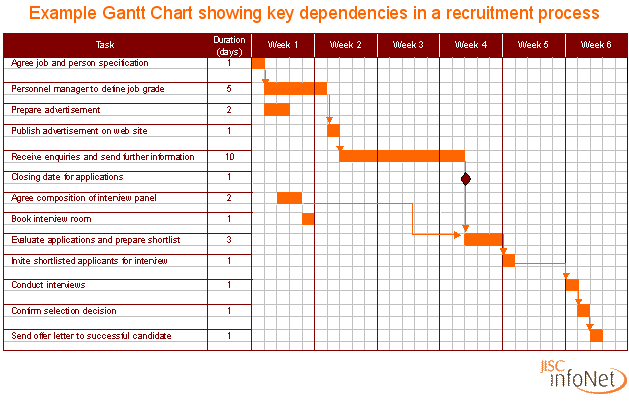
The hallmark of a PM is to be able to communicate every aspect of the project with everyone involved.  To be able to manage their resources in such a way as to not have any wasted dollars or time.  The project should be on track and on budget at each and every milestone.  Having a good Gantt chart, or at the very least a good plan of the project in excel will help to keep you from getting off track.  There are no good surprises in business and hardly ever any good surprises with projects!

Image


-Best to you and those that you care about.


Electronic News

Many of you will not really have much knowledge of what I am going to talk about here as it relates to the electronic industry and your pocket book. By the time your done reading this, you will be enlightened somewhat.ImageImage

Not too long ago some Chinese company produced something known to me and anyone who knows technology as a capacitor.  These live in just about any electronic device that you might have.

The problem is that the formula for these was invented in Japan and it was liberated “Stolen” from the Japanese plant and sold to someone in China.  Industrial espionage happens all of the time and there are many famous cases that I could site; The TV and Radio are two off the top of my head.

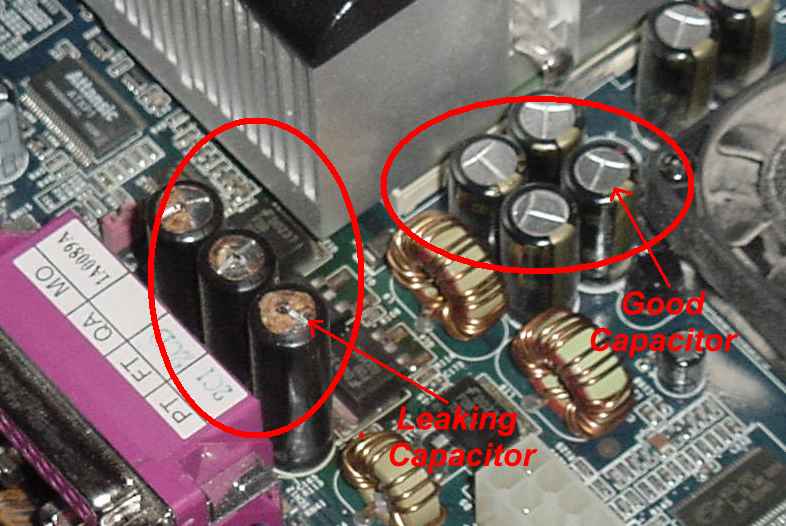
The problem with this formula is that they did not get all of it.  They got the part for the dielectric, (the part that separates the internal plates from shorting) but they did not obtain the stabilizer for the dielectric; so after a few months to a few years the dielectric breaks down and fails.   These capacitors were sold to many different manufacturers including Dell and LG to name two.

Other computer board manufacturers are also loaded with these defective capacitors.  One of my LG monitors stopped working and for about $6 and change and about one hour worth of work, I replaced all of the capacitors on the power supply/ inverter board and, Viola; the monitor is as good as new.  The most difficult part of the procedure was taking the monitor apart without damaging it.

Last night one of my desktop crapped out.  The power supply went south.  I happen to keep new power supplies on hand so I simply upgraded the power supply from 300 watts to 600 watts which also sports a larger cooling fan.  It was a win win!

As the power supply houses some pretty cool parts for those of us who still build things, I took it apart and there it was, a capacitor that was bloated, standing out like a sore thumb.  The fix probably would have cost me $.50 but as it was a 300 watt power supply I elected to scrap it.  300 watts is really too small, and of course much cheaper than a 600watt.

A few weeks ago I was working on a dell for a gentleman and the onboard video card was working terribly.  There were lines in the picture and it was not syncing correctly.  Examining the board around the GPU I noticed, you got it, puffy capacitors.  I installed an inexpensive video card and turned off the internal one. Problem solved until some of the other capacitors in the box fail.

A friend of mine works for a City here in Texas and part of his job has him traveling to the Dump of all places.  There in some building at the dump are flat screen TV’s microwaves and so forth that have been discarded.  He picked up several flat screen TV’s that were discarded and for a few dollars repaired them.  While he is the ultimate recycler, it is a shame that we do not repair things any more.  One has to wonder if we are spending too much time with video games instead of tinkering. One night at dinner with some friends I was gob smacked to learn that one of the guys at the table had no idea how to change spark plugs.   These are the type of people who call on people to do things for them.  While it may make financial sense to do this I simply cannot pay someone to do something that I am perfectly capable of doing with a few exceptions.

This week being “earth week” I would encourage you to think about getting things repaired instead of trashing them when they break.  Electronics are known in the industry as Ejunk.  There are companies that specialize in recycling this type of thing but, they are becoming harder to come by.   I suspect that the EPA makes this type of business a tough one to run, and not be out of compliance in some small way.

Most of us have no reason to know this but, the dumps all over the country are filling up.  There is a dump not too far from me here in north Texas that at one time was low land covered in water; and is now reminding me of the foothills in NorthernCA.

A lot of this e-junk is shipped to third world countries where families hover over open fires, melting the solder with the fire, removing the parts off the circuit boards for the metals that they contain.  Since it is an open fire, the board is blackened and the people doing this breath in those toxins along with their children who are helping.  It does not even stop there as this residue litters the grounds, the water supply, the air, and what have you.  We here in this country do not have a clue; we simply think that we do our part by most of the time, throwing that soda can in the blue bin.  Once we toss stuff into the bin do we ever think about it?

I come from a time when there was not so much stuff trashed.  I bought a broken TV at a garage sale for $5 as a kid; and learned how TV’s worked and for about $3.50 for a new high voltage rectifier tube, I had a nice looking portable TV at the age of 10. At 13 I wanted money to buy a new CB and antenna.  Mowing lawns seemed like a good job. One could make $4 a yard…. Currently I pay $25 a week, and this is one thing that I will not give up.  As I put my plan in the early 70’s together, I would first need a lawnmower as my dad was dead set about me not using the family lawn mower on others peoples yards.  He was right to be concerned as I killed 3 lawnmowers on one person’s yard for $2. That is another story..

Again I went to garage sales and found a lawn mower that did not work.  I pulled it through to make sure that there was compression and nothing bent, and bought it for $15.  After a trip to the library checking out a book on small engines, I digested the book.  Lawn mowers have points and a condenser under the flywheel and those are known to be problematic.  I checked for spark and there was none.  The local grocery store sold parts such as these and for a few $$ back in the day, so I now had my own lawn mower.

I purchased three lawnmowers all together in similar fashion along with an edger.  Gas cost about a quarter to fill up my can and that would last me about a week.  I created my fist direct marketing campaign at the age of 13 with three sheets of paper, two pieces of carbon paper and my best penmanship that I could muster.

I mow yards

Please call 242-XXXX

For an estimate, ask for Scott.

I wrote this until I filled up a sheet of paper and then cut them out much like Avery labels would look today. Armed with a shirt pocket full of “flyers” and some scotch tape I went door to door canvassing my entire neighborhood.

The interesting thing about all of this is that those types of campaigns have about a 2% return or hit rate.  That was the figure 42 years ago and oddly enough, that is still the figure today! I still do direct marketing campaigns; just not to do yard work. J

I did this for several summers; it paid for my first car, and lots of photographic equipment, and oh yes a CB that quickly turned into Ham Radio equipment.

Where are those entrepreneurs today?

As you can tell, I still do this today.  Not that I go buy things at garage sales to repair but, I do restore antique radios that I have purchased either online or from individuals. Some just make their way too me as friends know that I do it, and they are tired of storing it.

So when your flat screen TV dies if you know anyone with any technical prowess, have them search the web to see if someone has posted a fix.  It may very have been me.  Have them try it.  The parts are available in the form of a kit from some people online for as little as $12.

There is a good feeling that comes from repairing something that otherwise would have been put into that growing mountain of pampers, kitchen waste, and of course defective electronic devices that needed about $6 to $10 in parts.

As a side note I did this with cars as well.  At one time I had 13 cars which I bought for next to nothing as they were broken. I picked up parts from a junk yard that the owner had an old TV, which always needed fixing.  I would fix them and sell them and I enjoyed the process.  That was back before the computer was installed into the car which controls everything relying on sensors for information.

Like the lawnmower, back then you needed spark, gas, air and compression.  Today you need an analyzer of some sort that can interrogate the onboard computer and find out what the failure is.  Usually some sort of sensor that you did not know that you had.

-Best to you and those that you care about!
Scam of The Day!

Scam of the day!

Every day someone somewhere tries to embezzle money from someone.  If not some Nigerian trying to get your bank account number so they can give you free money, than someone somewhere through e-mail tries to get the unsuspecting, to click on a link that is not what they think it is.

Through the years I have received e-mails from all sorts of alleged government agencies telling me that I need to click here to resolve some complaint.

If you have a business like I do, and you have a website, you are more vulnerably because you are more visible.

As I have explained to people for years, the government would not contact you via e-mail.  Still I get computers in here that have been infected by someone clicking before thinking.

Today I got a rather unique e-mail from PayPal or so it would seem.

Looking at the e-mail notification one thing pops out at me immediately in that, it is flagged urgent.  PayPal does not flag things as urgent.  The perpetrator of this hoax wants to get my attention.  Secondly I have set up rules which automatically move certain e-mails from certain people. Upon receipt they are put into a specified folder arranged by who they are and where the e-mail is from.  This was my second clue that something was amiss, as this was in my Inbox, not in the folder where it should be.  So why didn’t the rule work, it was not from PayPal.

Looking at the e-mail itself, it looks fairly normal at first glance.  Notice it says that I sent $149 dollars for a watch to someone on eBay and that the shipping address is somewhere in New York.

I do purchase things on eBay, as do a lot of people, and it would not be unlike me to buy a watch for a $149.  Firstly, I did not buy a watch so now I am looking at this e-mail a little more closely and see that it is to be shipped to someone in New York!

Someone not paying too much attention to this would quickly see the link that offers you “dispute resolution” and then click upon it.  That is the gotcha and most likely the intent of this ruse. They want you to click on the link. Hovering over the link you will quickly notice that it does not go to PayPal or eBay.

Looking at the link, I really have no idea where it would take me or what it would do to my computer, if anything.  The trick here is not to be a victim of some nefarious person or people.  It may very well be a link to some website that tries to sell you something and they are driving traffic to it by disreputable means.  It could however be a link to some site which will infect your computer with some type of Trojan or malware or both.

One other trick that I will share with you is this.  As well as having good anti-virus software running and updated at all times, have a user account set up that does not allow administrative privileges on your machine.  Use that account for your normal daily computer use and only use the administrative account when adding or changing hardware and or software on your computer.  The virus and or malware may very well be limited to whatever rights that the user that got it, has.  If the user has no rights to modify the way a program behaves, the virus might be limited to those rights as well.

Remember that not all anti-virus software will protect you from all attempts to hijack your computer.   Not all viruses are created equally. The more sophisticated the virus, the more intelligence or (computer smarts) on the part of the user is necessary.

-Best to you and those that you care about!

Image

Which Anti Virus Software is the Best?

Selecting an anti virus software today is like trying to look at a watermelon in the store and telling how it is going to taste without opening it up. This is also the question that I get asked most frequently.

Not all software is the same and that holds true with the virus itself.

When I evaluate anti virus software I look for several things. Firstly what can I find in the way of reviews on the internet? Try to find independent reviews vs. going to their website.

Amazon frequently has reviews of products.

From a technical stand point I want to know what size footprint it has. When I say footprint I want to know how much of my available memory is it going to chew up and I want to know how much CPU is it going to use. There are several anti virus software’s out there that literally will stop you from using your machine while they scan, update etc. Ideally this type of software should run at a lower priority when you need the resources of your machine. To me there is nothing more frustrating than needing to check your e-mail and the anti virus software among other software takes over your machine for the first 30 minutes doing updates, scans and what have you.

Here is the biggie, will it catch everything?

Sadly there is no silver bullet. Some software makers have a lot of resources to pour into updates and research as well as the ability to quickly push out updates to their customers on an as needed basis. Software like Trend Micro has an easy way to upload suspicious files for them to analyze.

Another thing to look at with software is technical support. How much will you need, what do people say about their support and how much will it cost?

I have been in IT since before there were viruses. I fought the first virus which got out onto our network of several hundred employees through a shared file brought in by an employee on a floppy disk. I say that to set the stage for the different iterations of anti virus software out there. The first company on the scene was McAfee. PcTools was picked up by Symantic and over the last few years there have been many players enter into the game.

My personal favorite as of this moment is EsetNode32. That could change tomorrow as they may rest on their laurels or have a policy change of some sort which would affect the quality of their product. That is the same for all companies.

I see a lot of computers that have been infiltrated. While they all have some sort of protection, free software seems the most susceptible to attacks, MailWare and other forms of infections.

While free is better than none, I would certainly budget anti virus software into my computer needs.

TIP: Go to the store and purchase it in the box vs. getting it online. Do this even for the renewal. One can almost always find it on sale going to the office supply store or even Wal-Mart. Purchasing it online usually involves a third party which makes money off of the sale as well. You pay a price for convenience and it could be as much as 100% more than you would pay in the store. In the below URL’s you can gain quick access to the different brands that I am personally familiar with. Several ranking sites will rank these differently so do your research and roll the dice.

This blog in no way constitutes any type or warrantee or guarantee of usability or protection against the hackers either expressed or implied. While I have had good fortune with Eset, your mileage may vary and I will be held harmless, in the event that your results are not what mine have been.

What you do on the internet and who sends you e-mail may put your computer in less risk or more risk than me. There are independent labs out there that evaluate different software so you might search them out as well. The trick is make sure that they are independent and do not have any dog in the fight. The problem there however is obvious; if they don’t have a dog in the fight, why do the work and give it away? Do your own research. Consumer reports frequently look at this topic as well.

http://www.eset.com/us/

http://shop.trendmicro.com/brand/SB/?cm_mmc=Paid+Search:US-_-Consumer:Brand-_-Google:TrendMicroExact-_-KW=trend+micro&SQ=trend+micro

http://www.bitdefender.com

http://norton.symantec.com/norton/ps/3up_us_en_navnis360_sym_ent.html?om_sem_cid=hho_sem_sy:us:ggs:sy:e|kw0000006084|10257754940&country=US

http://promos.mcafee.com/offer.aspx?id=469920&affid=792&eid=covmcaggl89400000194617s&adid=17846076983&s_kwcid=TC|16933|mcafee||S|e|17846076983

http://usa.kaspersky.com/?domain=kaspersky.com

http://free.avg.com/us-en/homepage

http://www.avast.com/en-us/index

-Best and Happy Computing